Teaching lifesaving skills through immersive virtual reality
2
10K+
30%
25%
Overview
Following the pandemic, the American Heart Association explored new ways to deliver CPR and AED education that is engaging, inclusive, and measurable. Their goal was to increase access to lifesaving skills while improving confidence and performance through hands-on learning.
Problem
Traditional CPR and AED training is primarily in-person, time-consuming, and lacks measurable performance feedback. After COVID-19, access declined further, leaving limited flexible, data-driven, or realistic learning options.
Objective
Increase the number of people who feel confident and prepared to perform CPR and use an AED in real emergencies by improving access to effective and engaging training.
Success criteria
Improve learner confidence in performing CPR
Increase CPR accuracy through real-time feedback
Enable users to complete CPR and AED steps without guidance
Target audience
Primary Users: Teens and adults learning CPR for the first time
Secondary Users: Instructors and educators seeking consistent and measurable outcomes
Empathize
Understanding User Needs
Research methodologies
Learned CPR and AED procedures hands-on with AHA instructors to understand correct technique and training standards
Conducted a landscape analysis of existing CPR training and VR learning solutions to identify gaps in feedback, realism, and accessibility
Conducted in-person interviews with 2 first-time learners and 2 CPR instructors to understand both learning and teaching challenges
Landscape Analysis
While there were no direct competitors offering a fully immersive CPR training experience combining real-time feedback, guided instruction, and performance scoring, we reviewed existing solutions to understand how similar problems were being addressed.
What We Reviewed
Traditional CPR Training Programs — instructor-led sessions focused on physical practice but lacking scalable feedback and accessibility
VR Training Simulations — immersive learning experiences with strong realism but limited performance tracking and standardized assessment
Online Learning Platforms (e.g., video-based CPR tutorials) — accessible and scalable, but lacking hands-on interaction and real-time feedback
This analysis highlighted a gap between accessibility, realism, and measurable performance, which informed our focus on combining all three within a single VR experience.
User interview
To guide our interviews, we focused on understanding both learner and instructor perspectives:
Understand how learners retain CPR steps under pressure
Identify what feedback is needed to perform CPR correctly
Uncover what causes hesitation in taking action
Learn how instructors currently teach and evaluate CPR skills
Identify gaps in measuring performance accuracy
Understand how training can be made more engaging and accessible
Explore challenges in scaling CPR education beyond in-person sessions
User stories
From our interviews, we mapped what both learners and instructors need to feel confident and effective:
As a learner, I want training that feels realistic, so I can remember what to do in emergencies
As a learner, I want real-time feedback, so I can fix mistakes while performing CPR
As a learner, I want simple and intuitive controls, so I can focus on learning, not navigating VR
As a learner, I want clear performance results, so I know how well I did
As a learner, I want guided AED practice, so I feel confident using one in a real emergency
As an instructor, I want measurable performance data, so I can assess if learners are performing CPR correctly
As an instructor, I want consistent training outcomes, so all learners meet the same standard
As an instructor, I want scalable training tools, so I can teach more students beyond physical limitations
As an instructor, I want engaging learning methods, so students stay focused and retain information
Define
Aligning Insights for Direction
Key insights from research
After synthesizing findings from landscape analysis, hands-on training with AHA instructors, and user interviews, we identified key insights that informed our design direction.
Learners rely on real-time feedback to adjust compression depth and rhythm correctly
Progress visibility motivates continued practice
Simple interactions reduce cognitive load and keep focus on learning
Inclusive representation increases comfort and trust
Bilingual support removes barriers to understanding
Real-world simulation improves recall during emergencies
Guided AED training reduces hesitation in real-world situations
Instructors need measurable performance data to accurately assess CPR technique
Instructors struggle to consistently evaluate compression depth and rhythm in traditional training
Scalable, repeatable training solutions are critical to reaching more learners
Personas
To validate these insights and ground them in real user behaviors, we developed personas representing our primary and secondary user groups.


Ideate
Planning the Right Solution
Checking project goals
These insights informed how we aligned user needs with AHA’s business goals to define clear project goals.

UX strategy
Based on these insights, we focused on improving performance accuracy and user confidence, the two biggest barriers to taking action.
Use hand tracking to reinforce correct compression technique
Provide real-time feedback on depth, rhythm, and positioning
Include diverse manikins to support inclusive learning
Use real-world simulation to improve recall under pressure
Design simple interactions to reduce friction
Add performance scoring to motivate improvement
Provide Spanish language support and captions
Include guided AED practice for full emergency readiness
Translating needs into features
With the UX strategy defined, we translated key user and instructor needs into core features.
Need for realistic, hands-on training
Design
Visualizing the Experience
UX flow
Once we aligned on strategy, I moved into designing how the experience should flow and feel in VR. The interface was intentionally kept minimal to reduce cognitive load and keep focus on the learner’s hands and actions.
The experience was designed around two clear learning paths that support both skill building and skill assessment:
Learn Mode: Step-by-step CPR and AED training using a manikin with guided instructions.
Practice Mode: Realistic scenario where users are tested through performance checkpoints and scoring.

Low-fidelity wireframe
With the flow established, I built out low-fidelity wireframes to bring the experience into a VR context. These screens focused on layout, hierarchy, and functional interaction points to ensure the learning journey was intuitive from the start.
Design system
AHA did not have a VR-ready design system, so I built one from scratch by modernizing their existing brand elements for immersive use. The system features high-contrast colors, legible typography, and modular components for clear readability in VR. It is flexible and scalable, supporting future updates while maintaining a consistent AHA visual identity.
Lub Dub
AHA Red
#C10E21
Deep Red
#990000
White
#FFFFFF
Gray
#636466
Black
#000000
Final design
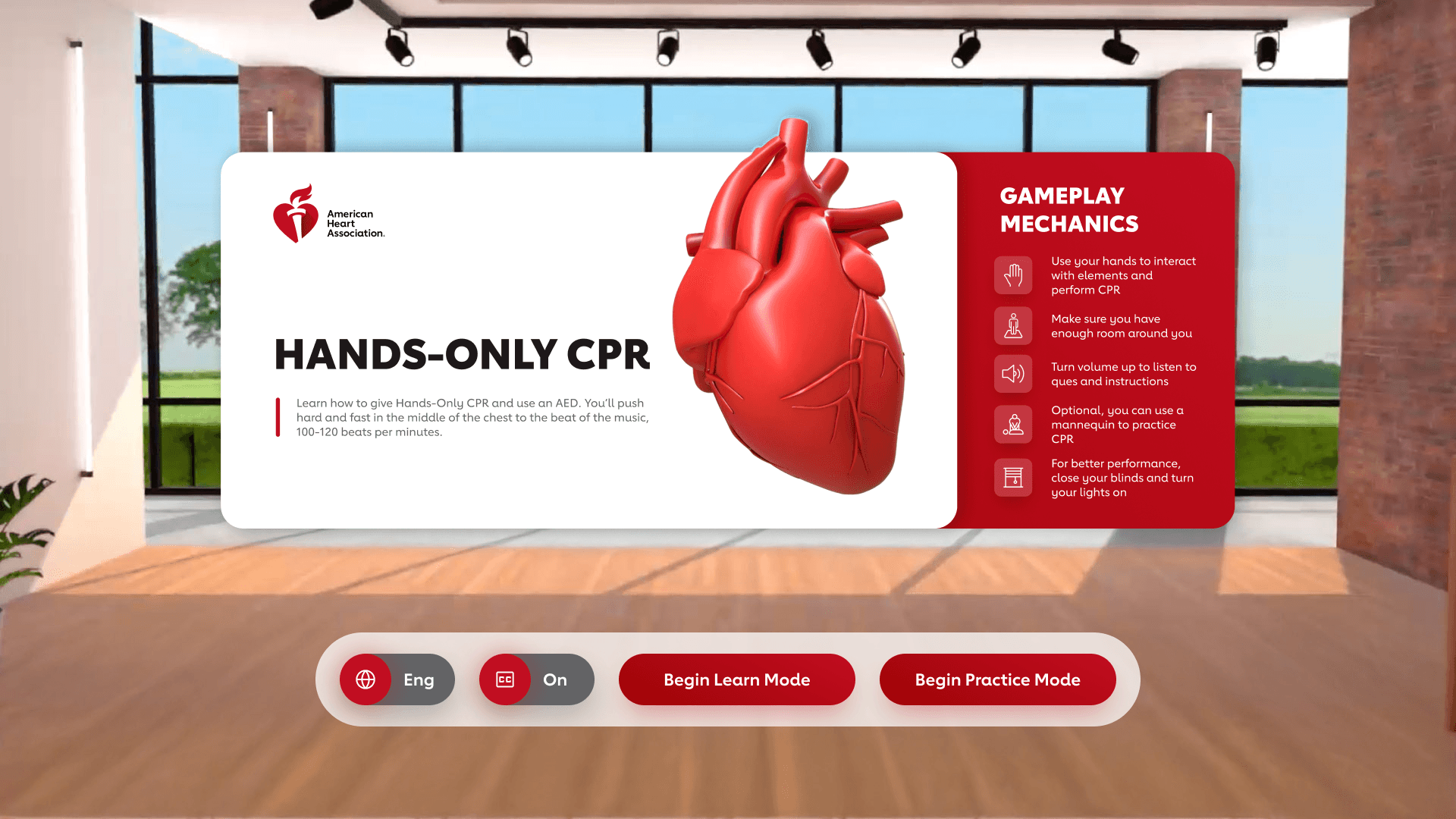
01. Hub
To simplify onboarding and reduce friction, the Hub serves as the central control space for the experience. Users can switch languages, toggle captions, and choose between Learn and Practice modes. Learn Mode provides guided CPR and AED training, while Practice Mode allows users to apply their skills and receive performance-based scoring.
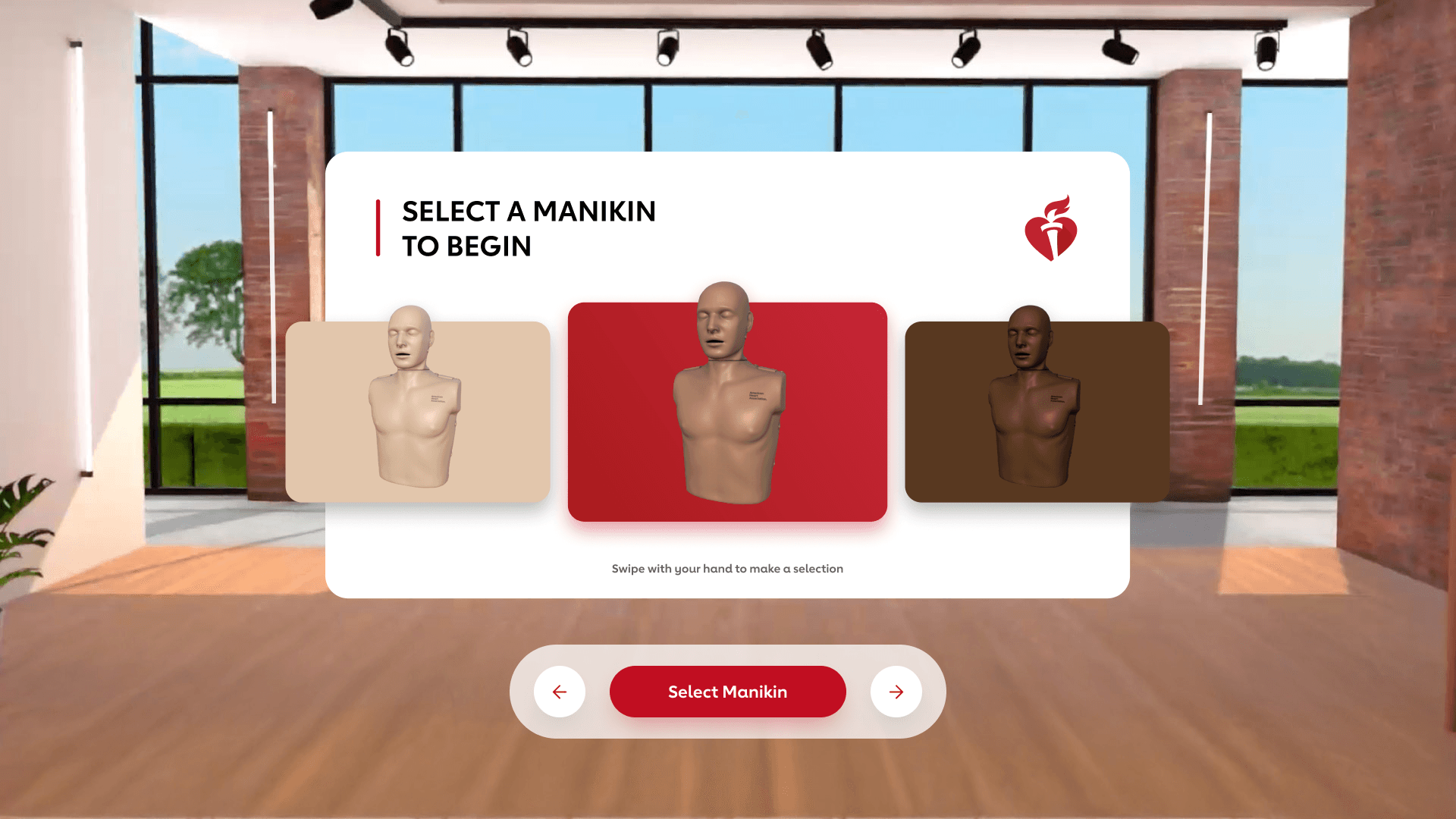
02. Manikin selection
To support inclusivity and representation, users can select from a range of CPR manikins with different skin tones. This ensures learners feel reflected in the training experience and aligns with AHA’s goal of making CPR education more inclusive.
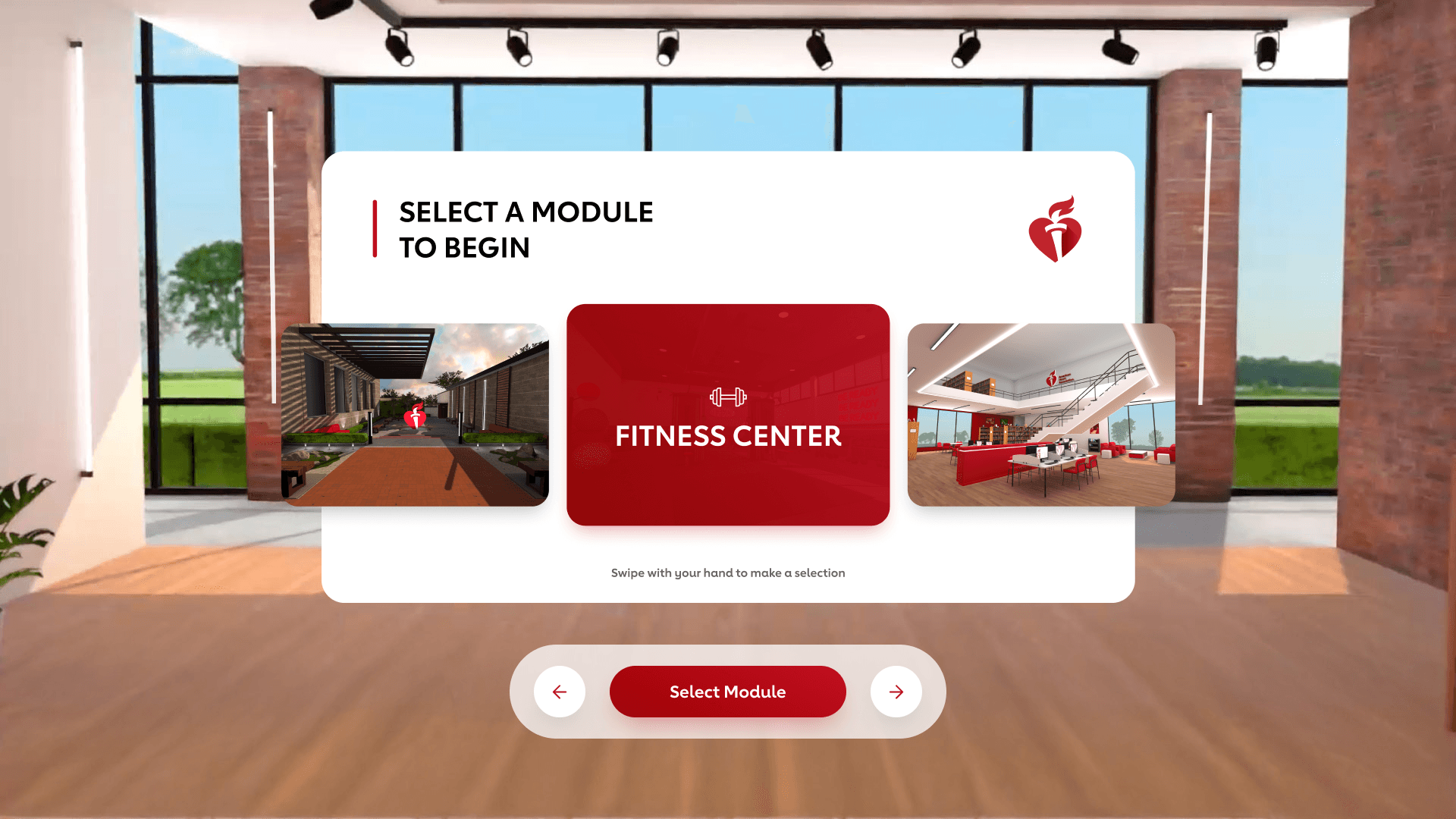
03. Location options
To improve real-world recall, users can choose from familiar environments such as a gym, library, or courtyard. Practicing in varied, realistic settings helps learners better retain steps and apply them in actual emergencies.
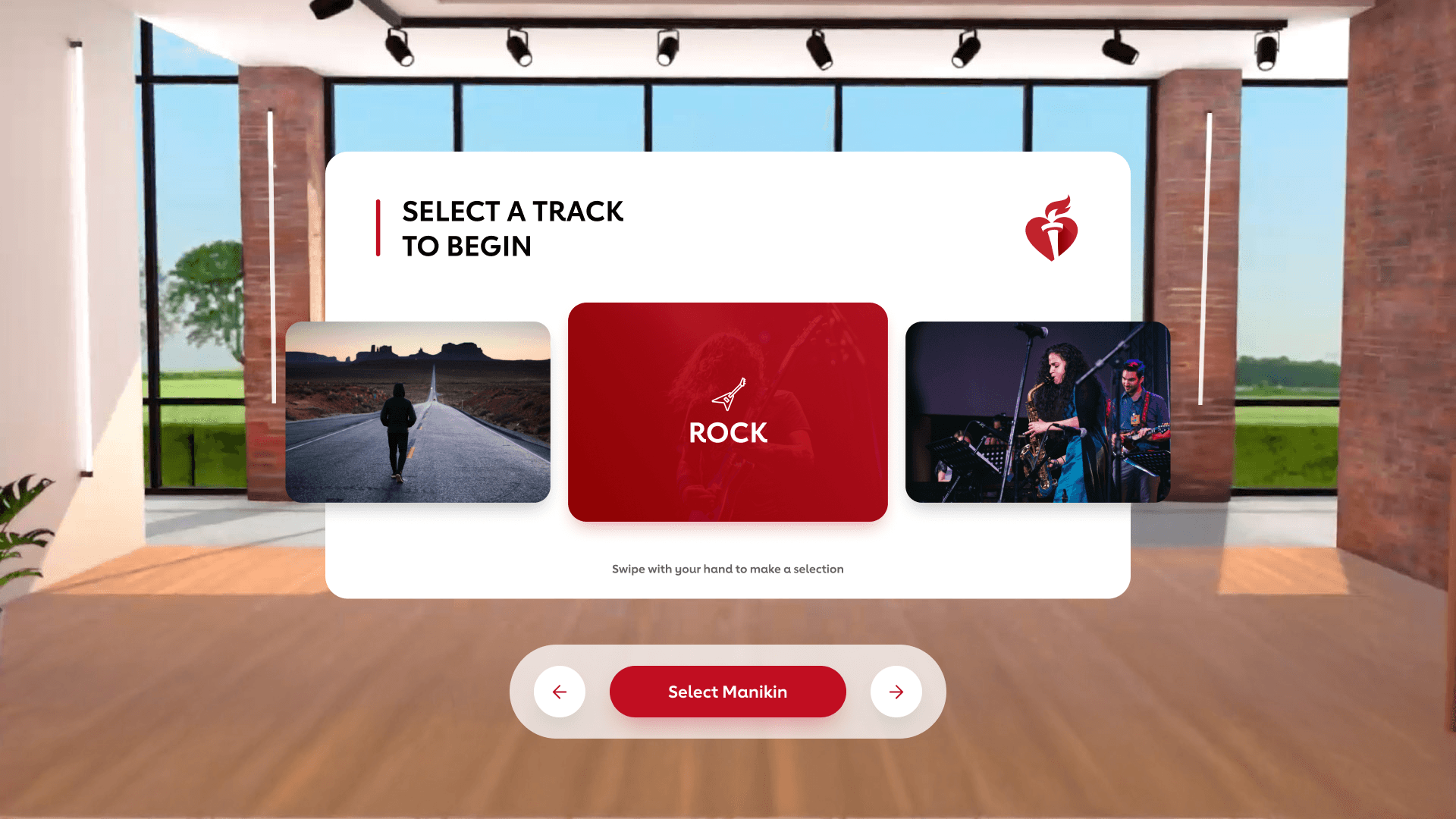
04. Music selection
To maintain proper CPR rhythm, users can select music tracks that match the recommended compression rate of 100–120 BPM. This helps guide consistent pacing while enhancing engagement within the immersive environment.
05. CPR & AED instructions
To guide first-time learners, the experience provides step-by-step instructions for performing Hands-Only CPR and using an AED. This structured approach ensures users understand each step before moving into practice.
06. Hands-Only CPR practice
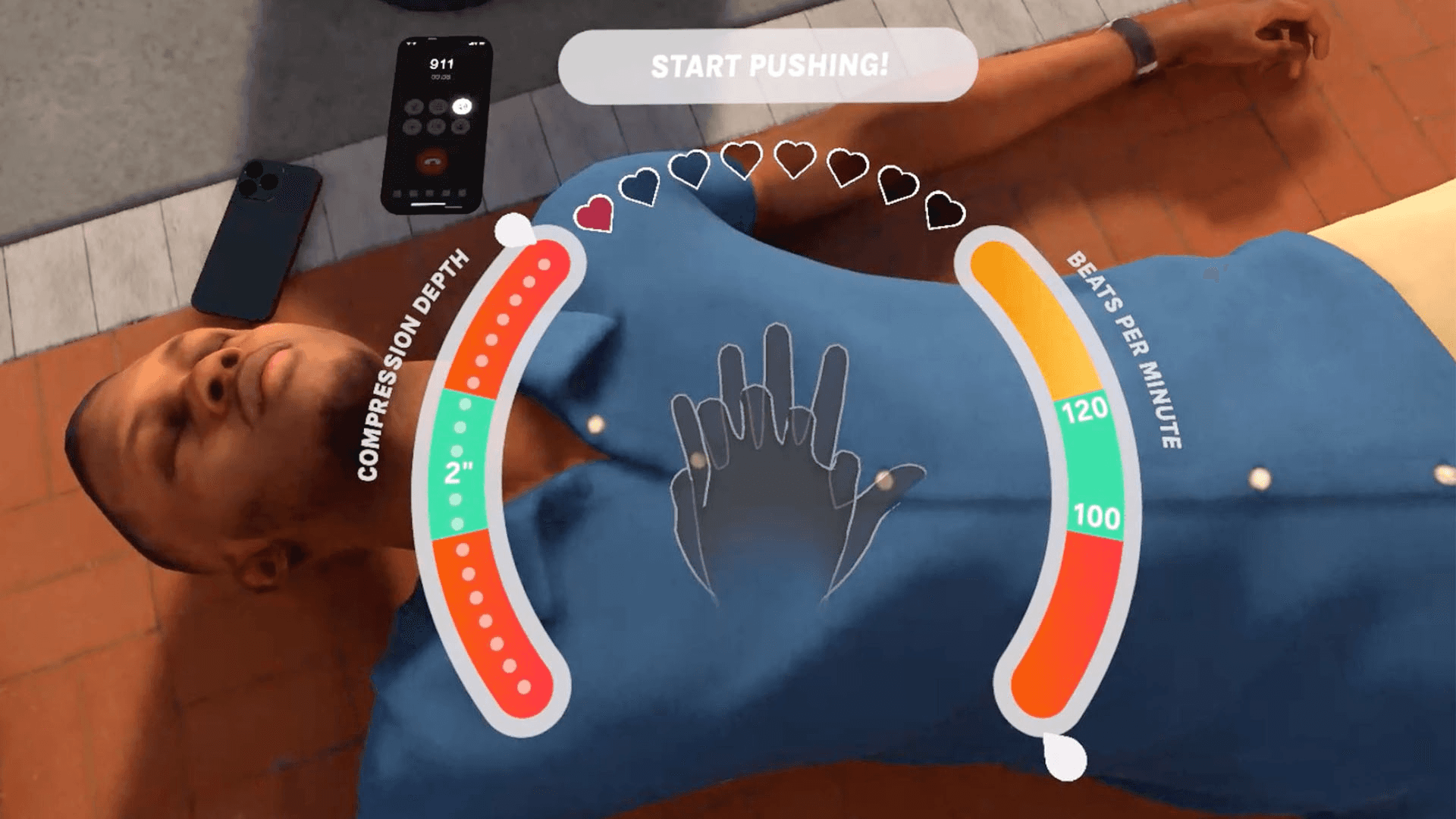
To reinforce muscle memory and improve accuracy, users practice CPR using hand tracking for proper placement and technique. A floating gauge provides real-time feedback on compression depth and rhythm, enabling immediate correction.
07. Performance evaluation
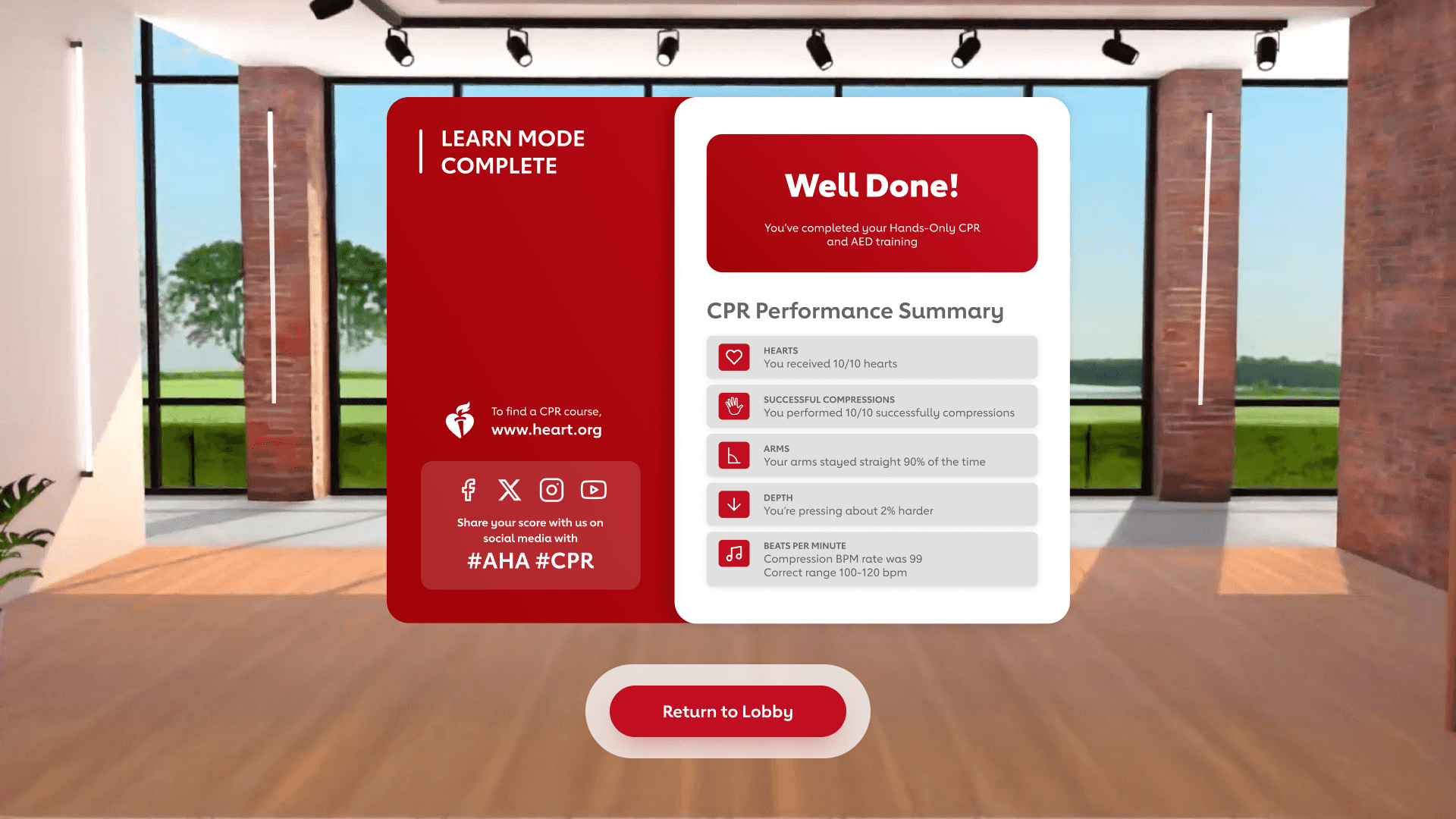
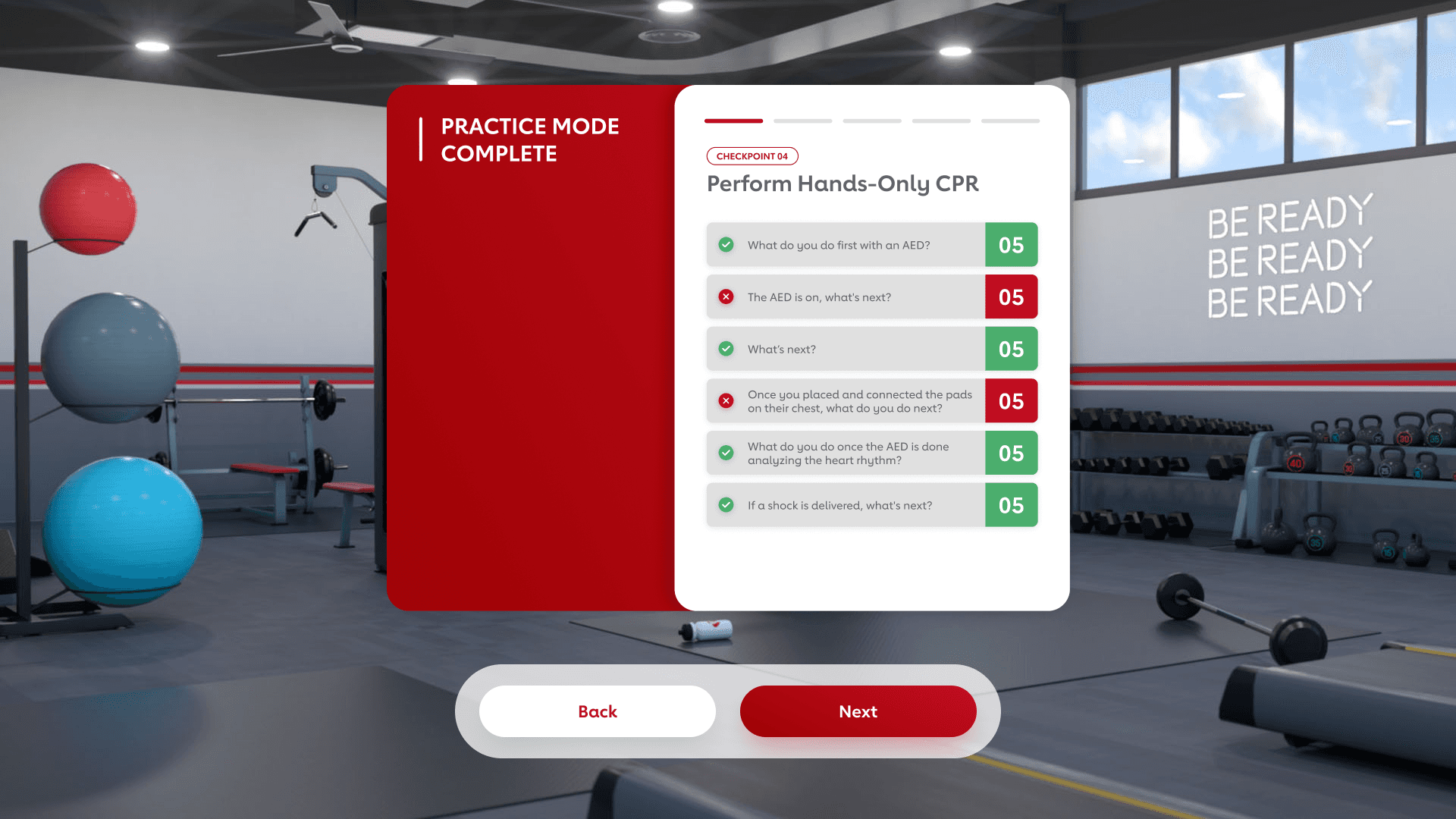
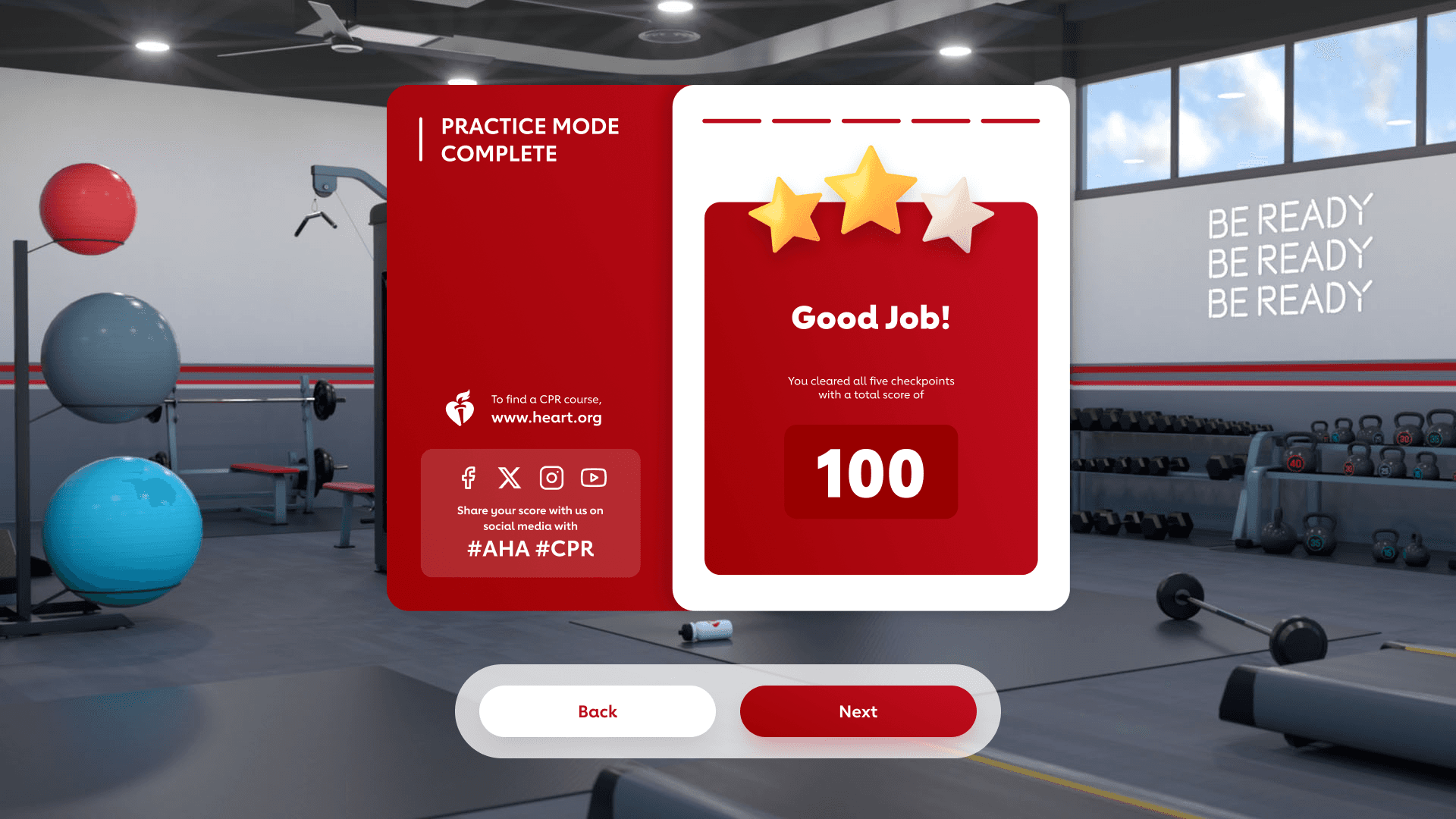
To support both learner improvement and instructor evaluation, the system includes a scoring framework that assesses safety, response actions, and CPR performance. Users receive a detailed breakdown at the end, helping them understand areas for improvement while enabling standardized assessment. This also enables instructors to consistently evaluate learner performance.
Test & Iterate
Refining Through Feedback
Usability testing
To validate our design decisions, we conducted usability testing using a rough but functional VR build.
Testing approach
We tested the experience with four participants:
2 learners (first-time CPR trainees)
2 educators/trainers (experienced in CPR instruction)
To capture both guided and real-world usage:
1 learner and 1 educator tested in-person at the studio
1 learner and 1 educator tested remotely using their own headset at home
This approach allowed us to observe:
Whether users performed actions as intended in a controlled environment
How users interacted with the experience independently in a real-world setting
Testing objectives
We aimed to evaluate:
How intuitive the hand-tracking interactions were
Whether users understood what actions to take and when
If feedback systems clearly communicated CPR performance accuracy
How confident users felt performing CPR after the experience
Whether users could complete the experience without guidance
Finding #1
Interaction friction slowed users down
Users struggled to accurately interact with the UI using pinch + point gestures, especially when elements were placed farther away. This created hesitation and slowed down task completion.

Design iteration
Moved interactive elements into a close-range dock and replaced pinch gestures with direct tap interactions

Iteration impact
Faster and more intuitive interactions
Reduced cognitive load
Improved usability for first-time VR users
Finding #2
Feedback lacked clarity for performance improvement
In the initial flow, pulsing red waves appeared over the person’s chest during compressions, changing intensity based on how hard or soft the user pushed, accompanied by voice prompts for guidance. However, user testing showed that this system alone did not provide enough data to accurately guide users on their CPR performance.

Design iteration
Introduced a UI meter gauge positioned above the user’s hands to display real-time BPM (beats per minute) and compression depth, providing clear and measurable performance indicators.
Iteration impact
Clear, measurable performance feedback
Enabled immediate correction
Increased confidence and accuracy
Impact
Available on the Meta App Lab Store, expanding CPR training beyond in-person sessions
Surpassed the initial goal of 8,000 learners, reaching 10K+ users
Internal evaluation showed a 30% increase in learner confidence and readiness, driven by real-time feedback and guided practice
Internal evaluation indicated a 25% improvement in CPR compression accuracy through real-time performance feedback
These results validate that combining immersive learning with real-time feedback leads to measurable improvements in performance and confidence. By reaching more learners outside traditional settings, the experience directly supports AHA’s mission to increase lifesaving readiness.
Learnings
Designing for VR reinforced the importance of testing directly in the medium. While designs may feel polished on a 2D screen, interactions behave differently in 3D space. Frequent in-headset testing was critical to validating scale, placement, and usability, ensuring the experience felt intuitive and immersive.
Awards
WINNER BEST VR
AWE USA Auggie Awards
Category: Healthcare and Wellness Solutions
EXCELLENCE
Communicator Award
Category: General-Immersive Brand Experience
Gold
Summit Creative Award
Category: Engagement / Experiential / VR
Silver
ADDY Awards – AAF Dallas
Category: Virtual Reality